TinyPivot now includes an Embedded AI Analyst - natural language queries that generate SQL against your data. What makes it unique is the embedded part.
Most AI-powered data tools work like this: you leave your app, go to some external dashboard, paste in your data or connect a database, ask your question, then copy results back. It’s clunky. It breaks your flow.
TinyPivot’s AI Analyst is different. It’s a component you drop directly into your app.
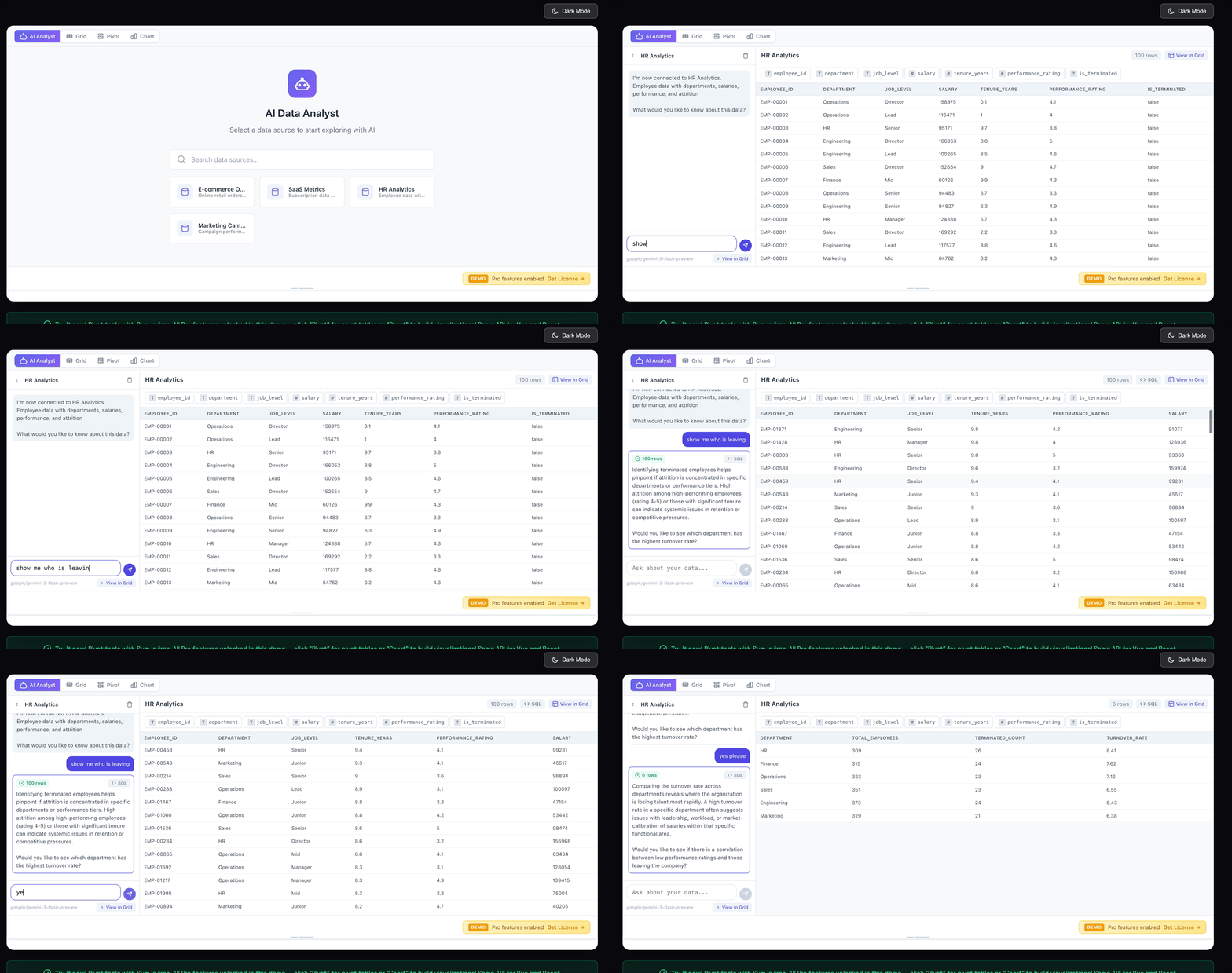
The Split-Panel Experience
The Embedded AI Analyst uses a split-panel layout:
- Left side (1/4 width): Conversational chat interface
- Right side (3/4 width): Live data preview that updates with each query
Users type questions like “Show me sales by region” or “What’s our return rate by product category?” The AI generates SQL, executes it, and displays results immediately in the right panel. No page reloads, no context switching.
The magic is in the tight integration. When users find interesting data, they can click “View in Grid” to load those results directly into TinyPivot’s full data grid with pivot tables, charts, and all the features they’re already familiar with.
How It Works Under the Hood
The architecture is surprisingly simple:
-
Schema Discovery: When the component mounts, it introspects your data source (PostgreSQL tables or in-memory arrays) to understand column names and types.
-
System Prompt Engineering: The AI receives a carefully crafted prompt that includes your schema, SQL generation rules, and response formatting instructions. This is where most of the “intelligence” lives - teaching the LLM how to be a good data analyst.
-
SQL Generation & Validation: The AI generates SELECT queries. Before execution, TinyPivot validates them - blocking INSERT, UPDATE, DELETE, or any mutation statements.
-
Result Binding: Query results attach to the conversation message, so users can click any past message to see its associated data.
Here’s the validation logic that keeps your database safe:
// Only SELECT and WITH (for CTEs) are allowed
// Everything else is blocked: INSERT, UPDATE, DELETE, DROP, ALTER, etc.
function validateSQLSafety(sql: string): { valid: boolean; error?: string } {
  const normalized = sql.trim().toUpperCase()
  if (!normalized.startsWith('SELECT') && !normalized.startsWith('WITH')) {
    return { valid: false, error: 'Only SELECT queries are allowed' }
  }
  // Additional checks for multiple statements, etc.
  return { valid: true }
}
Three Deployment Modes
We designed the AI Analyst to fit different security and infrastructure requirements:
1. Full Server Mode
Your PostgreSQL database on the backend, AI proxied through your server. Best for production apps with existing databases.
2. Client-Side + AI Proxy
Data lives in the browser via DuckDB WASM. The AI only sees your schema, never your actual data. SQL executes entirely client-side. Perfect for apps with strict data privacy requirements.
3. Demo Mode
Canned responses and mock data. No API key required. Great for public demos or trials.
The BYOK Approach
I’m not interested in building another AI middleman that charges $0.10 per query. TinyPivot uses Bring Your Own Key (BYOK):
- Drop in your OpenAI, Anthropic, or OpenRouter API key
- Pay your provider directly at their rates
- Switch models anytime via environment variable
- No TinyPivot markup, no usage caps
The component auto-detects your provider from the key format:
| Key Format | Provider | Default Model |
|---|---|---|
sk-... |
OpenAI | gpt-4o-mini |
sk-ant-... |
Anthropic | claude-3-haiku |
sk-or-... |
OpenRouter | anthropic/claude-3-haiku |
Want better quality? Set AI_MODEL=claude-sonnet-4-20250514 and you’re done.
Integration
If you’re already using TinyPivot, adding the AI Analyst is straightforward:
<template>
  <AIAnalyst
    :ai-endpoint="'/api/tinypivot'"
    :data-sources="[
      { id: 'sales', table: 'sales', name: 'Sales Data' },
      { id: 'customers', table: 'customers', name: 'Customer Records' }
    ]"
  />
</template>
Or with client-side data:
<template>
  <AIAnalyst
    :ai-endpoint="'/api/tinypivot'"
    :data-sources="[{ id: 'local', name: 'My Data' }]"
    :data="myDataArray"
    :query-executor="runDuckDBQuery"
  />
</template>
The backend handler is equally simple:
import { createTinyPivotHandler } from '@smallwebco/tinypivot-server'

export default createTinyPivotHandler({
  aiApiKey: process.env.OPENAI_API_KEY,
  databaseUrl: process.env.DATABASE_URL,
  tables: {
    include: ['sales', 'customers', 'products'],
    exclude: ['_migrations', 'sessions']
  }
})
Security By Default
A few things we baked in:
- SQL validation: Only SELECT/WITH statements execute
- Table filtering: Control exactly which tables are exposed to the AI
- Error sanitization: Database errors strip sensitive info (connection strings, IPs) before reaching the client
- Schema-only prompts: In client-side mode, the AI never sees actual data values
What This Enables
The embedded approach opens up use cases that external AI tools can’t touch:
- In-app analytics: Users explore data without leaving your product
- Self-service BI: Business users ask questions without learning SQL
- Customer-facing insights: Embed analytics in customer dashboards
- Internal tools: Give your team a chat interface to production data
Try It
The Embedded AI Analyst is available now for TinyPivot Pro license holders. Check out the live demo or grab a license starting at $49 (one-time, lifetime access).
If you’re already a Pro user, update to the latest version and follow the AI Analyst setup guide.
Questions? Find me on X @bricevallieres or open an issue on GitHub.